


Download ToniArts EasyCleaner – System Cleaner, Registry Cleaner, Disk Cleanup, Internet Privacy, Shortcut Manager
Overview
ToniArts EasyCleaner is a free utility application designed to help users maintain and optimize their Windows-based systems through a range of cleaning and maintenance functions. The app targets individuals seeking a straightforward way to improve system performance by removing temporary files, invalid shortcuts, and browser-related data. It is particularly suited for users who value simplicity and efficiency in system management tools, including both casual computer users and those with minimal technical expertise.
The application addresses common issues such as cluttered storage, slow startup times, and accumulated digital footprints left by web browsing and software usage. By offering centralized access to key system maintenance tasks, ToniArts EasyCleaner streamlines the process of keeping a Windows device running smoothly. Its core functionality revolves around cleaning, organizing, and securing the system environment without requiring advanced user knowledge.
Developed by ToniArts, the app is positioned as a lightweight, no-frills tool within the utilities category. Although specific details about the developer’s background or history were not provided, the app’s release on June 1, 2024, indicates it is a recent entry in the system optimization space. The software’s focus on essential cleaning features suggests it is intended for users looking for a minimal yet effective solution rather than a comprehensive system suite.
Real-world use cases include routine system cleanup after software installations, clearing browsing traces for privacy, and managing startup programs to improve boot speed. In the broader app ecosystem, ToniArts EasyCleaner fills a niche for users who prefer a compact, dedicated tool over bloated all-in-one utilities. Its free pricing model further enhances accessibility, making it a viable option for users seeking reliable maintenance without cost.
Key Features & Functionality
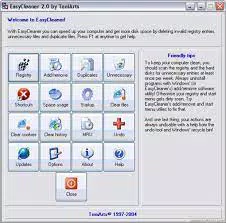
- Streamlined User Interface: The app features a clean, clearly labeled interface that simplifies access to core functions. Buttons are well-organized, allowing users to initiate system cleaning tasks with minimal navigation. This design benefits users unfamiliar with technical system settings, reducing the risk of accidental misconfiguration.
- Registry and Shortcut Cleanup: EasyCleaner scans and identifies invalid registry entries and duplicate or broken shortcuts. Removing these elements helps prevent system errors and improves overall stability. Users can clear these components in one click, promoting a more organized digital workspace.
- Program Uninstallation Tool: The app includes a built-in feature to uninstall software directly from its interface. This eliminates the need to navigate through Windows’ standard control panel, offering a faster and more centralized approach to managing installed programs.
- Startup Program Management: Users can view and disable unnecessary programs that launch automatically at boot. This feature helps reduce startup time and frees up system resources, contributing to smoother daily performance.
- Internet File and Cookie Removal: The software clears temporary internet files, cookies, and browsing history. While it only supports Internet Explorer, this function aids in protecting user privacy and preventing tracking by websites. The absence of selective removal options limits customization but ensures a quick, full cleanup.
- Disk Usage Visualization: A built-in disk usage display provides a real-time overview of storage allocation across drives. This allows users to monitor space consumption and identify areas requiring attention, supporting proactive storage management.
- Undo Functionality: One of the app’s standout safety features is the undo button, which allows users to restore most deleted items. This reduces the risk of irreversible data loss and enhances user confidence during cleaning operations.
Practical Use-Case Examples
For example, a user experiencing slow boot times can use the startup manager to disable unused programs. Another user concerned about privacy can run a full cleanup to remove browsing traces. A person managing multiple software installations may use the uninstaller tool to quickly remove outdated applications. These scenarios highlight how EasyCleaner integrates into everyday system maintenance routines.
Interface, UX & Performance
The user interface of ToniArts EasyCleaner is designed with clarity and accessibility in mind. The layout is minimalistic, with large, clearly labeled buttons that guide users through each cleaning function. Navigation is linear and intuitive, allowing users to complete tasks in a few clicks without confusion. The visual style prioritizes function over ornamentation, which aligns with the app’s utility-focused purpose.
Interaction flow is straightforward: users select a category (e.g., registry, shortcuts, browser data), initiate the scan, and confirm the cleanup. The process is seamless and does not require technical understanding. The undo feature further enhances the user experience by providing a safety net during deletions.
Although the developer did not list formal performance metrics, the app’s small file size of 3.2 MB suggests it is optimized for low resource consumption. It is expected to run efficiently on a wide range of Windows devices, including older systems. Responsiveness is likely consistent with its lightweight design, though specific benchmarks were not provided. Stability appears to be a priority, given the inclusion of the undo function, which indicates attention to user safety during operations.
Platform Compatibility & Technical Requirements
ToniArts EasyCleaner is designed exclusively for the Windows platform. The app requires a Windows operating system, though specific version requirements were not listed. The file size is 3.2 MB, indicating a lightweight installation that should not strain system resources.
Compatibility information was not fully disclosed, so users should ensure their system meets general Windows standards for running third-party utilities. The app is available as a free download, with no in-app purchases or subscription models. The latest version, 1.0.0, was released on June 1, 2024.
Pros and Cons
Pros
- Free to download and use with no hidden costs
- Simple, intuitive interface suitable for non-technical users
- Comprehensive cleaning options including registry, shortcuts, and browser data
- Includes an undo function for safe data recovery
- Small file size ensures low system impact
- Startup management and program uninstallation tools enhance system control
Cons
- Only supports Internet Explorer for browser cleanup
- Limited customization for selective file removal
- Specific OS version requirements were not disclosed
- No built-in update notifications or automatic update checks
- Developer background and support details were not provided
FAQ
Is ToniArts EasyCleaner safe to use?
The app is designed to remove temporary and redundant system files. The inclusion of an undo function adds a layer of safety. However, users should exercise caution when cleaning the registry and ensure they understand the implications of such actions.
Can I update ToniArts EasyCleaner automatically?
Automatic update functionality was not mentioned. Users may need to manually check for updates on the developer’s website or official distribution channel.
Does EasyCleaner work on Windows 10 and Windows 11?
The app is built for Windows, but specific compatibility with Windows 10 or 11 was not confirmed. Users should verify system requirements before installation.
Is the app available for Android or iOS?
Currently, ToniArts EasyCleaner is only available for Windows. There is no information about mobile versions or cross-platform availability.
Can I selectively remove files instead of clearing everything?
The app does not support selective removal of files. It performs full cleanup for each category, which may affect user preferences for granular control.
Final Thoughts
ToniArts EasyCleaner stands out as a lightweight, free utility that delivers core system maintenance features with a user-first approach. Its straightforward interface, combined with essential tools like registry cleaning, shortcut management, and startup optimization, makes it a practical choice for users aiming to keep their Windows devices running efficiently.
While limitations such as exclusive support for Internet Explorer and lack of selective cleanup options are notable, the app’s undo function and minimal system footprint help mitigate risks. It is especially valuable for users who want a no-nonsense tool without the complexity of larger system suites.
For anyone seeking a simple, secure way to clean up their computer and improve performance, ToniArts EasyCleaner offers a compelling value proposition. With its free model and focus on essential functions, it serves as a reliable companion for routine system upkeep.
Download ToniArts EasyCleaner now


